
How I use AI across the full design cycle
A structured account of AI-assisted discovery, research synthesis, prompt-engineered prototyping, and workflow acceleration at S4Labour with measurable delivery impact.
TLDR;
Problem: As the sole designer across two apps and a desktop product, mobile enhancements kept deprioritising behind desktop work, not for lack of ideas, but for lack of time.
Solution: Built a structured AI workflow using Figma Make and Claude to go from evidence to interactive prototype in hours, not days, while retaining full design ownership over user journey, accessibility, and edge cases.
Impact: Three mobile features shipped in parallel with desktop work. Prototype review time dropped from days to hours, reducing clarification loops and getting stakeholder feedback earlier.
CONTEXT
I was the only designer at S4Labour , covering two mobile apps, a desktop product, a design system, and a live product roadmap. With design teams getting leaner across the industry, this is increasingly the norm. The pressure wasn't a lack of ideas. It was throughput.
THE LEARNING CURVE
I'd been using gen AI tools casually with minimal prompting to get quick and mediocre outputs.
This lead me to spend some time in actually learning how to do this properly. I completed two structured courses: IBM's Prompt Engineering Basics and GenAI for UX Designers. What shifted wasn't just my technique, it was my mental model.
I stopped treating AI as a generator and started treating it as a fast, junior collaborator. Good at scaffolding, bad at judgment. Once that clicked, I built a workflow around it.
MY AI WORKFLOW
01
Evidence first
Pendo analytics to identify real friction — drop-off points, repeated behaviours, missed actions. Compressed into a tight problem summary before touching any tools.
02
60-min discovery to define scope
A focused session with stakeholders to align on success criteria, MVP boundaries, required states, and permission rules — before AI generated anything.
03
Structured prompt writing Figma Make
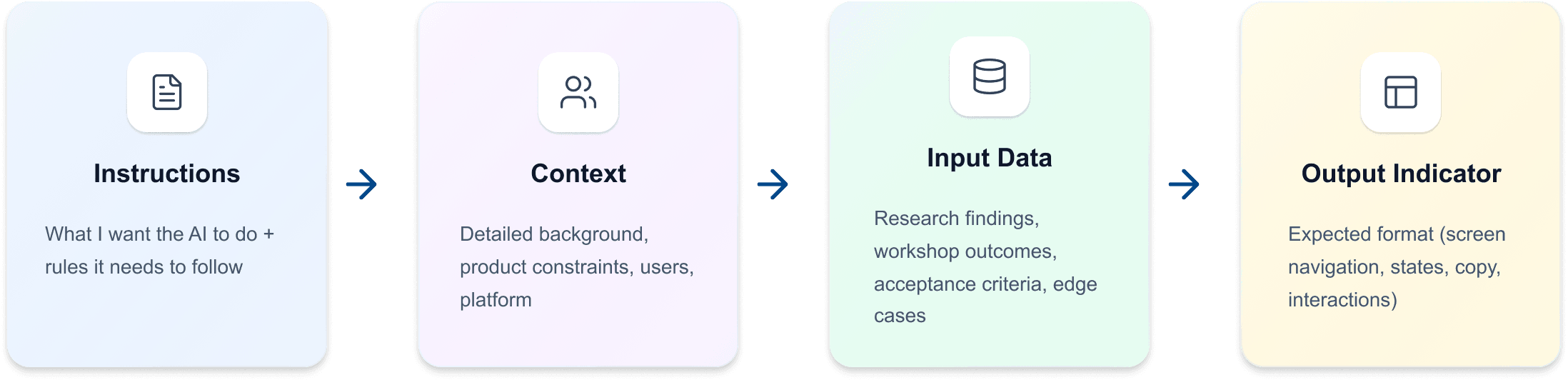
A consistent prompt format covering context, user, task, constraints, and component patterns — fed directly into Figma Make to generate interactive prototype drafts.
04
Generate, then take over Figma Make → Figma
Figma Make produced the initial interactive scaffold. I then took over in Figma to refine hierarchy, accessibility, edge cases, navigation logic, and pattern consistency — everything that requires judgement rather than generation.
GUARDRAILS: What AI did vs What I owned
AI Accelerated: Initial layout scaffolding, multiple flow options to compare, micro-copy variants, edge case prompts, A/B versions for early testing.
I retained ownership of: The end-to-end journey and behavioural logic, MVP prioritisation, accessibility sign-off, ethical considerations, and final UI pattern consistency.
PROJECT 1: ABSENCE APPROVAL IN THE S4MANAGE APP
PROBLEM
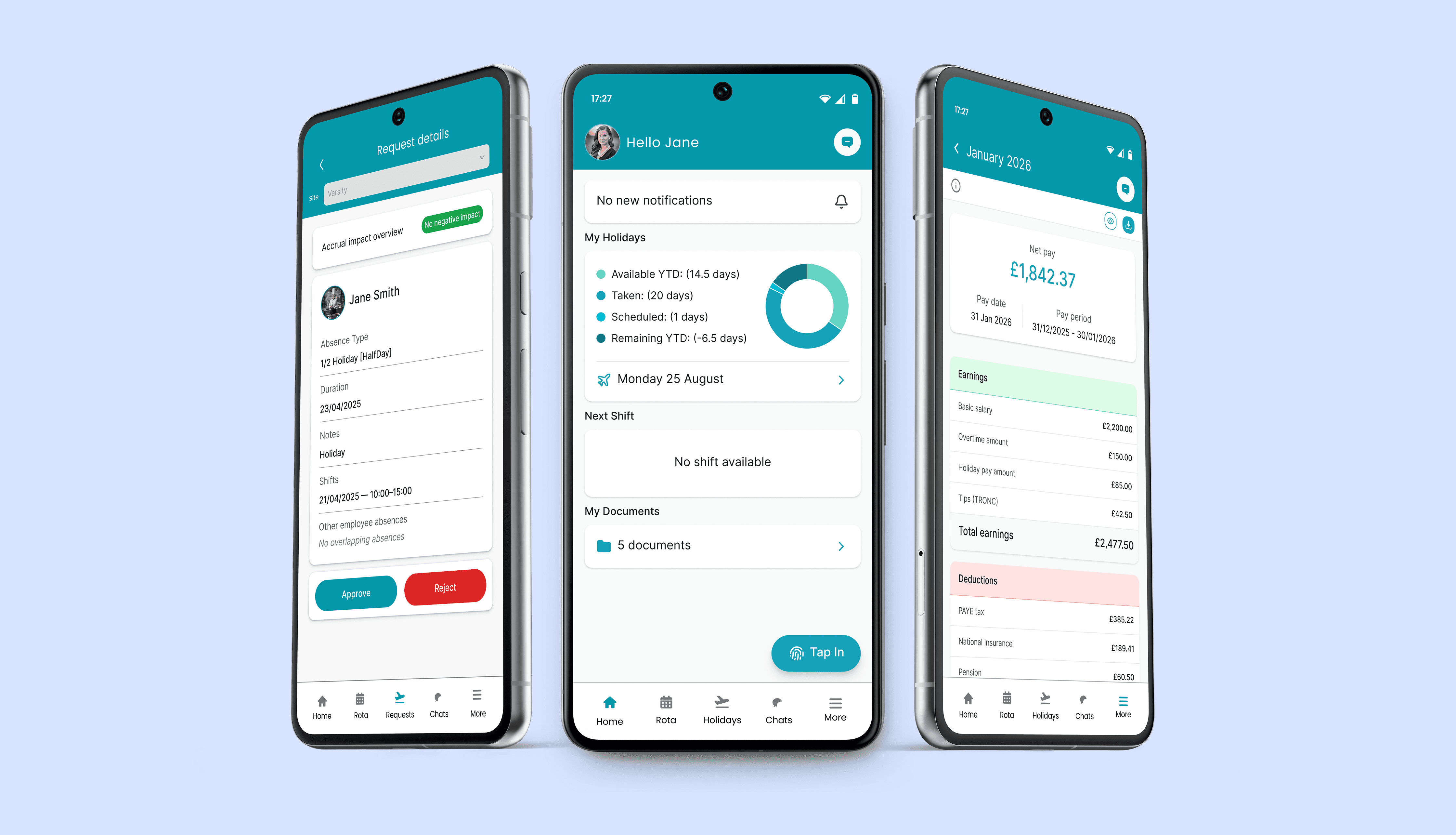
Managers needed a clear mobile-first way to review imapct on holiday accrual for an employees before actioning absences without having to do the mental math on holiday accruals. Accrual impact had to be visible at the decision point.
HUMAN-LED DECISIONS
Full flow structure, navigation, and state behaviour.
Holiday accrual impact logic at decision time.
Information hierarchy: what matters when approving.
Consistency with existing S4Manage mobile patterns.
AI ACCELERATED
Initial layout scaffolding, approve/reject state variants, micro-copy options, coverage of empty and error states.
OUTCOME
Early customer release of this way of working showed reduced manager decision time. It took the team 4 days to release the feature which was a massive win on speed of delivery for the business.
PROJECT 2: PAYSLIPS IN THE EMPLOYEE APP
PROBLEM
As part of our payroll initiative, we needed to show payslips in the employee app - S4connect. When a payroll is processed we wanted our employee app to pull in pay information from the payroll system to allow employees to view and download payslips.
HUMAN-LED DECISIONS
List organisation, default view, information hierarchy.
Download/PDF affordances placed appropriately.
All empty, error, and loading states fully specified.
Anonymised data used throughout for privacy.
AI ACCELERATED
Layout scaffolding for payslip list, alternative card structures for detail view, micro-copy for financial summary headers.
OUTCOME
Scannable list with fast detail access. Tips and deductions clearly surfaced. All edge cases specified in handoff.
PROJECT 3: SURFACE REJECTION REASON ON DECLINED HOLIDAY REQUESTS
PROBLEM
When requests were rejected, employees got no notification and no reason, causing frustration and awkward follow-up conversations that damaged team relationships.
HUMAN-LED DECISIONS
Where and when the rejection reason is displayed
Micro-copy tone: respectful, action-led, not punitive
Suggested examples to guide managers toward clear language
Edge cases: no reason, long text, sensitive content
AI ACCELERATED
Tone variants for rejection copy, flow options for surfacing the reason, suggested example text for the manager input.
OUTCOME
Rejection reason visible in the past tab of the holidays tab. Tone is action-led, not punitive.
OUTCOME
Managers told us the absence approval feature gave them the context they needed to make decisions without chasing the employee first. That was the signal, not the prototype looking good, but the ability to actually deliver impact quickly.
6
6
mobile features shipped in parallel
Days to Hours
Days to Hours
time to first clickable prototype
Fewer loops
Fewer loops
clarification questions in Jira/Slack
REFLECTION
“The highest value AI brought was speed and breadth of options, not judgement. That distinction matters enormously.
Prototypes can become too believable too fast, which makes it tempting to skip the hard thinking.
The guardrails I built weren't about distrust, they were about knowing where AI genuinely adds value and where a designer's judgement is irreplaceable.
That's the line I'll keep refining.”
TLDR;
Problem: As the sole designer across two apps and a desktop product, mobile enhancements kept deprioritising behind desktop work, not for lack of ideas, but for lack of time.
Solution: Built a structured AI workflow using Figma Make and Claude to go from evidence to interactive prototype in hours, not days, while retaining full design ownership over user journey, accessibility, and edge cases.
Impact: Three mobile features shipped in parallel with desktop work. Prototype review time dropped from days to hours, reducing clarification loops and getting stakeholder feedback earlier.
CONTEXT
I was the only designer at S4Labour , covering two mobile apps, a desktop product, a design system, and a live product roadmap. With design teams getting leaner across the industry, this is increasingly the norm. The pressure wasn't a lack of ideas. It was throughput.
THE LEARNING CURVE
I'd been using gen AI tools casually with minimal prompting to get quick and mediocre outputs.
This lead me to spend some time in actually learning how to do this properly. I completed two structured courses: IBM's Prompt Engineering Basics and GenAI for UX Designers. What shifted wasn't just my technique, it was my mental model.
I stopped treating AI as a generator and started treating it as a fast, junior collaborator. Good at scaffolding, bad at judgment. Once that clicked, I built a workflow around it.
MY AI WORKFLOW
01
Evidence first
Pendo analytics to identify real friction — drop-off points, repeated behaviours, missed actions. Compressed into a tight problem summary before touching any tools.
02
60-min discovery to define scope
A focused session with stakeholders to align on success criteria, MVP boundaries, required states, and permission rules — before AI generated anything.
03
Structured prompt writing Figma Make
A consistent prompt format covering context, user, task, constraints, and component patterns — fed directly into Figma Make to generate interactive prototype drafts.
04
Generate, then take over Figma Make → Figma
Figma Make produced the initial interactive scaffold. I then took over in Figma to refine hierarchy, accessibility, edge cases, navigation logic, and pattern consistency — everything that requires judgement rather than generation.
GUARDRAILS: What AI did vs What I owned
AI Accelerated: Initial layout scaffolding, multiple flow options to compare, micro-copy variants, edge case prompts, A/B versions for early testing.
I retained ownership of: The end-to-end journey and behavioural logic, MVP prioritisation, accessibility sign-off, ethical considerations, and final UI pattern consistency.
PROJECT 1: ABSENCE APPROVAL IN THE S4MANAGE APP
PROBLEM
Managers needed a clear mobile-first way to review impact on holiday accrual for an employees before actioning absences without having to do the mental math on holiday accruals. Accrual impact had to be visible at the decision point.
HUMAN-LED DECISIONS
Full flow structure, navigation, and state behaviour.
Holiday accrual impact logic at decision time.
Information hierarchy: what matters when approving.
Consistency with existing S4Manage mobile patterns.
AI ACCELERATED
Initial layout scaffolding, approve/reject state variants, micro-copy options, coverage of empty and error states.
OUTCOME
Early customer release of this way of working showed reduced manager decision time. It took the team 4 days to release the feature which was a massive win on speed of delivery for the business.
PROBLEM
As part of our payroll initiative, we needed to show payslips in the employee app - S4connect. When a payroll is processed we wanted our employee app to pull in pay information from the payroll system to allow employees to view and download payslips.
HUMAN-LED DECISIONS
List organisation, default view, information hierarchy.
Download/PDF affordances placed appropriately.
All empty, error, and loading states fully specified.
Anonymised data used throughout for privacy.
AI ACCELERATED
Layout scaffolding for payslip list, alternative card structures for detail view, micro-copy for financial summary headers.
OUTCOME
Scannable list with fast detail access. Tips and deductions clearly surfaced. All edge cases specified in handoff.
PROJECT 2: PAYSLIPS IN THE EMPLOYEE APP
PROJECT 3: SURFACE REJECTION REASON ON DECLINED HOLIDAY REQUESTS
PROBLEM
When requests were rejected, employees got no notification and no reason, causing frustration and awkward follow-up conversations that damaged team relationships.
HUMAN-LED DECISIONS
Where and when the rejection reason is displayed.
Micro-copy tone: respectful, action-led, not punitive.
Suggested examples to guide managers toward clear language
Edge cases: no reason, long text, sensitive content.
AI ACCELERATED
Tone variants for rejection copy, flow options for surfacing the reason, suggested example text for the manager input.
OUTCOME
Rejection reason visible in the past tab of the holidays tab. Tone is action-led, not punitive.
OUTCOME
Managers told us the absence approval feature gave them the context they needed to make decisions without chasing the employee first. That was the signal, not the prototype looking good, but the ability to actually deliver impact quickly.
6
mobile features shipped in parallel
Days to Hours
time to first clickable prototype
Fewer loops
clarification questions in Jira/Slack
REFELCTION